
Save Time: Get 5 Simple Writing Tips
you can put to use in 10 minutes
How to Use Keywords to Write Better Web Pages: FAQs
Award-winning writer Kathy Widenhouse has written 9 books and garnered 800K+ views for her writing tutorials.
Updated 9.3.26
When you know how to use keywords, you can write better web pages, blogs, and social media posts.
Keywords are terms and phrases that define a piece of content.
They help drive search engine page results rankings, so the keywords you choose can lead readers to your website, blog, or social media platform for free. (Yay!)
But for many of us, using keywords creates jitters … and a whole pack of uncertainties. How do I find the right ones? Where do I use them? Why is Google so hung up on them?
Let’s eliminate those fears with some answers to your most frequently asked questions.
How to use keywords to write better web pages: FAQs
Q. Why are keywords such a big deal when I’m writing online?
Keywords connect what people are searching for with the content you create.
- When a reader types a question into Google or another search engine, keywords help the search engine figure out which pages are most relevant. Keywords aren’t “magic ranking words,” but clues to reader intent.
- When you use well-chosen and well-placed keywords, your content becomes visible because search engines understand what your page is about.
Think about the difference between writing “coffee makers” versus “best coffee makers for college students.” The second phrase tells search engines — and readers — exactly who the content is for and what problem it solves. Specific keyword phrases attract better traffic and more engaged readers.
Q. How do I find the
right keywords to target on a page?
Thoughtful keyword research will help you discover the words and phrases people are actually typing into search engines. Write quality content for those keywords – then your pages have a higher chance of returning on the first page or two on search engine results pages.
Try these strategies:
- Understand search intent. What are your readers looking for? Create a list of keywords that match your readers’ “why.”
- Use keyword research tools. My fave keyword tools for beginners are Google Keyword Planner, Keywords Everywhere, and Ubersuggest. They’ll help you find relevant keywords for your topic. These tools return data that show you how many pages already use that term (supply) and how many users are searching for those terms (demand) – in other words, what kind of competition your page may have in search results.
- Find terms with decent traffic but lower competition. Many writers struggle with choosing between broad keywords (“coffee”) and more specific phrases (“how to grind fresh coffee beans”). You’ll get a stronger set of usable keywords when you …
- Identify and use long-tail keywords made up of 4-5+ phrases (hence the “long tail”) that are very topic-specific. These are your heavy lifters as you write individual pages or posts. Sprinkle broad keywords (generalized one-word terms or short phrases) throughout your site or blog.
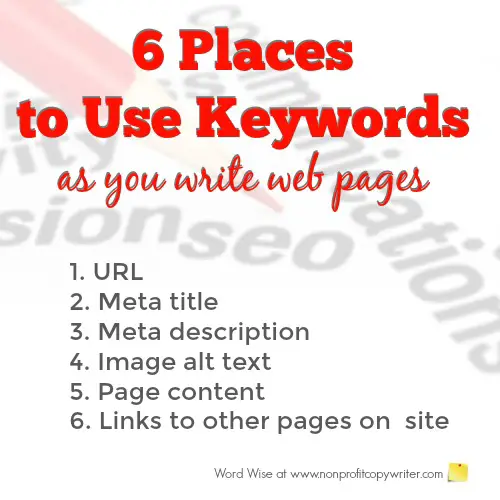
Q. Where should
keywords go in a blog post or web page?
As you write your content and load your page or post, use keywords in these on-page components.
- URL: The web address of the page. For example, this page’s URL is www.nonprofitcopywriter.com/use-keywords.
- Meta title tag: Text that appears as the page title in the web browser. You add the title tag in the back end or header of your site (depending on your website platform) as you write the page. The best titles are 50-60 characters. Longer than that will be cut off by the browser. Shorter may not be descriptive enough to differentiate from other pages.
- Meta description: A summary of the page’s content, added in the back end or header of your site. The meta description is the snippet of content that appears below a page link in your search results. Keep it to 160 characters or less, if possible, because search engines like brevity.
- Image alt text: Include your keyword so that search engines can understand what the image shows and to give readers an explanation when images cannot be found.
- Page content: Of these, the most important is page content. Use your page’s main keyword in the first 90 characters of the page and then sprinkled throughout the page. A word of warning: don’t use your page or post’s primary keyword in excess … the search engines penalize for what they call “keyword stuffing.” About once per every 150-300 words should do it nicely.
- Links to and from other pages on your site. You’ll give readers the opportunity to get more information on another page, plus you’ll repeat your keyword(s) and boost your site’s ranking.
Q. What’s the difference between primary and secondary keywords?
A page or post’s primary keyword is the main term or phrase that best summarizes its content. For instance, if you have a website or blog about making coffee, your primary keyword could be “coffee makers.”
Secondary keywords are terms or phrases that are closely related to your primary keyword. Your keyword research will turn up synonyms, subtopics, and long-tail keyword variations to use as secondary keywords.
Use this step-by-step guide to identify seed (primary) keywords for your blog or website.
Q. What are semantic keywords?
Semantic keywords are words and phrases that are closely related in meaning to your main keyword and help search engines understand the full topic of your content.
Instead of focusing only on one exact phrase, semantic keywords include variations, synonyms, and conceptually related terms that appear naturally in real language.
Go back to our website example about coffee makers. You’re writing a page about coffee makers for college students. Semantic keywords may include small coffee maker, compact coffee machine, single-serve coffee maker, drip coffee maker, pod coffee machine, portable coffee maker, dorm room coffee maker, mini coffee brewer, budget coffee maker, easy-use coffee machine … you get the idea.
Q. How many times should I use a keyword on a page?
There is no magic number, but a great rule of thumb is to focus on one primary keyword and 2–4 secondary keywords per page.
Then, aim for a composite keyword density of 1% to 2% -- about 1–2 keyword mentions per 100 words. That includes both primary and secondary keywords, because search engines (like Google) look for topics rather than just exact words.
For instance, on a page whose primary keyword is “coffee makers for college students,” you could include related secondary keywords like Keurig coffee maker and cheap coffee maker.
Q. What is keyword stuffing?
Keyword stuffing is the practice of overloading a web page with the same term or phrase so you can manipulate search engine rankings.
Don’t do it.
By stuffing keywords onto your page, your writing becomes repetitive, awkward, unnatural, and hard to read. Plus, keyword stuffing triggers spam signals in search engines.
Instead of stuffing the same keyword over and over onto your page or post, try including variations of your primary keyword, synonyms, and secondary keywords.
Using our “coffee makers for college students” example, you could try coffee machine, coffee brewer, coffeepot, drip brewer, percolator, or coffee-making machine.
And always making sure the content is useful for the reader.
Q. What’s the difference between keywords and search
intent?
Keywords are simply terms or phrases readers look for. You use those terms in your content.
Search intent is the reader’s goal when they use the term to search. What information does he want? Knowing your reader is key.
For example, someone searching “coffee makers for college students” wants comparisons and reviews, while someone searching “how to make coffee in a dorm room” wants a tutorial.
Understanding intent helps writers create pages that satisfy both readers and search engines.
Who is the ideal reader for your piece of content? Find out with this reusable guide.
Q. Why isn’t my page ranking even though I used the keyword?
Keywords alone are not enough to push your content to Page 1 of search results.
Search engines use a host of factors to rank pages, like page authority, backlinks, competition, site speed, user experience, topical depth, and content quality …
It’s easy to get overwhelmed and discouraged. But know this: Rankings change minute by minute.
Your job? Choose and place your keywords wisely. And most of all, produce the highest-quality content possible. Do that, and eventually your pages will start to rank.
Q. How can I use keywords naturally?
Which is most important to you: Ranking on search engines or helping your reader understand the answer to his question or solution to his problem?
If you answered, “Helping my reader understand,” then give yourself a high five. You’re well on your way to using keywords naturally.
The key shift is this: instead of writing for keywords ...write about a topic.
Then, let keywords appear where they naturally fit. Ask yourself, “What is my reader actually searching for — what do they need? How can I give them the best answer?”
Some practical tips to help you use keywords naturally …
- Focus on the topic and the reader’s need for information rather than repeating specific words over and over.
- Instead of forcing a keyword into every sentence, they place it in key areas like the title, introduction, and a few headings.
- Use related phrases, synonyms, and variations throughout the rest of the content to build meaning across the page. This helps the writing sound natural while still making it clear to search engines what the page is about.
- Write the way people speak. Ask questions.
Do all that, and your content will not only be easier to read. It will bring you the traffic and readers you’re looking for.
Best of all, it will be helpful to users.
More Web Content Writing Tips
50 SEO Terms Every Content Writer Should Know (and Why) ...
Searching for Keywords? Use These SEO Writing Terms ...
How to Find Seed Keywords for Your Blog or Website ...
The Skinny on Thin Content: Don’t Put Rankings Over Readers ...
Contextual Links and Why You Need Them on Your Website ...
Build Backlinks and Build Your Traffic: A Beginner’s Guide ...
The 3 Types of Links Your Website Needs and How to Build Them ...
What Is SEO Content Writing? Tips for Strong Search Results ...
The Top Online Copywriting Tip ...
How Keywords Work: an overview ...
Keyword Glossary: Quick SEO Jargon at Your Fingertips ...
Long Tail Keywords: A Quick Guide to Using Unpopular Search Terms ...
It’s "Easy"! One Word That Makes Writing Powerful Key Phrases Simple...
3 Ways to Write Conversationally Online (and Off) ...
Review: Conversational Copywriting - an Online Writing Course ...
Web Writing and Writing for Print: how they are different ...
Web Content Copywriting for Newbies ...
More Online Writing Tips on our Pinterest board ...
Return from How to Use Keywords to Nonprofit Copywriter home
As an Amazon Associate I earn from qualifying purchases.
Share This Page

Named to 2022 Writer's Digest list
BEST GENRE/NICHE WRITING WEBSITE


Stop Wasting Time!
Grab your exclusive FREE guide, "5 Simple Writing Tips You Can Put to Use in 10 Minutes or Less"
 Subscribe To This Site